

Features
Everything You Need to Optimize Product Content
Score every product page, fix the weak ones with your review, and measure what changed.
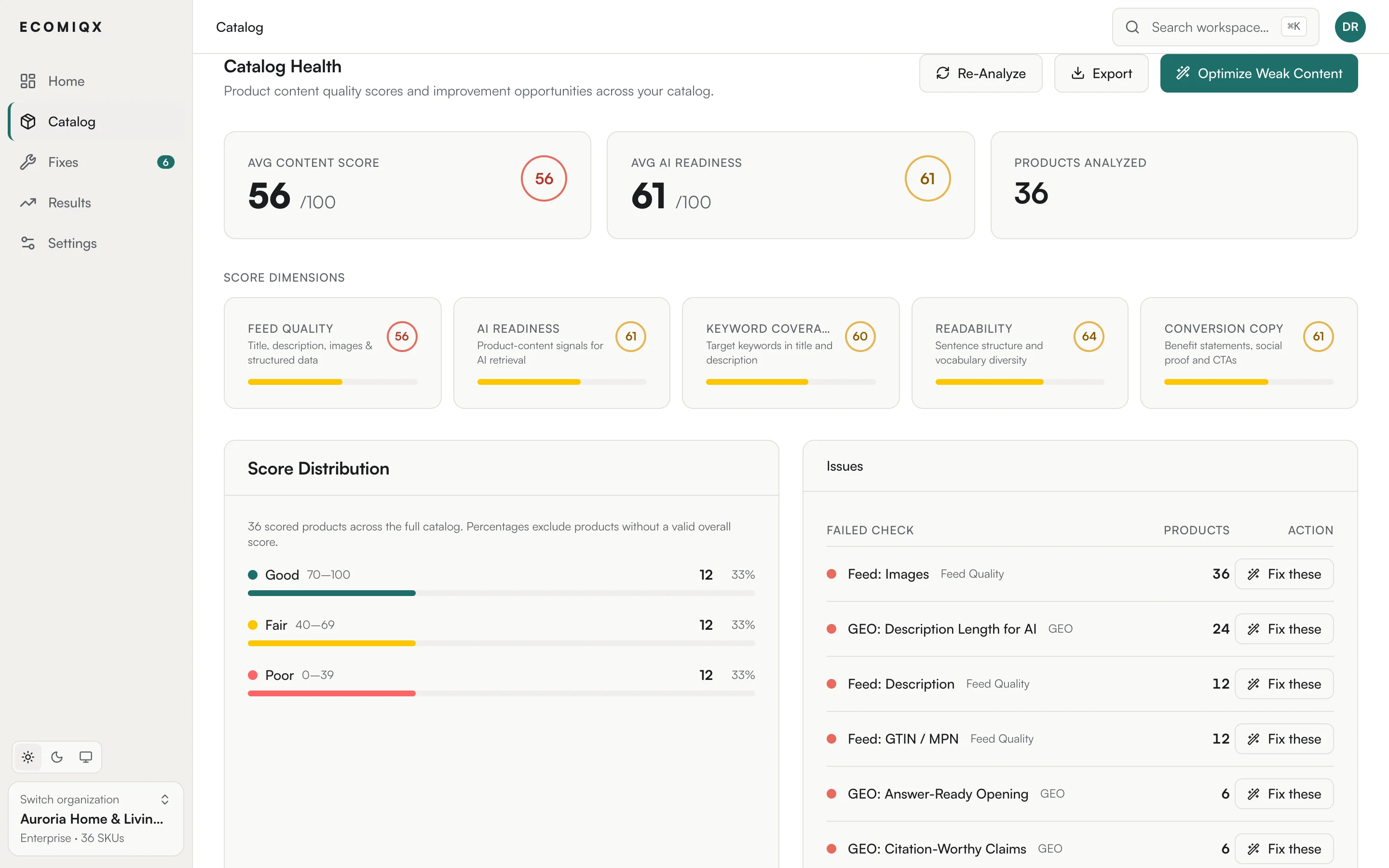
Content Health Scoring
Every product gets a score from 0 to 100 and the checks it fails. Catalog health shows how many products fail each check. The checks cover the title, description, keyword coverage, readability, conversion copy, AI answer readiness, images and structured data.
The weakest pages come first, so your team knows where to start. Filter by score range, category or issue and export the list.
- A score and the failed checks for every product page
- Re-scored when your catalog syncs or the content changes
- Issues ranked so the weakest pages come first
- Filter and export by score range or issue
Rewrites in Your Brand Voice
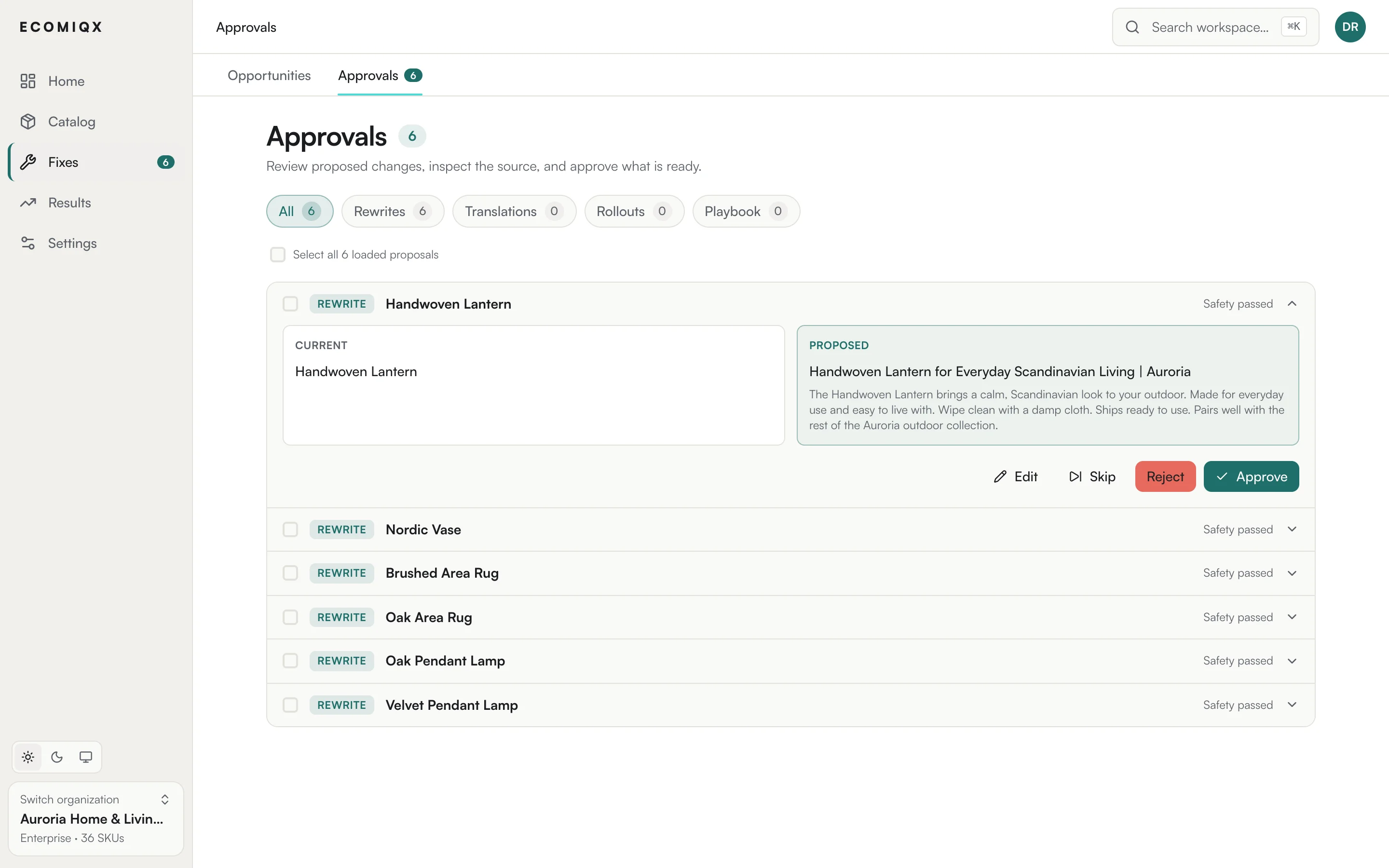
Rewrites follow your brand voice profile: tone, formality, vocabulary, preferred terms and terms to avoid.
Drafts land in a review queue next to the current text. Approve, edit or reject each one; a published rewrite can be rolled back.
- Brand voice profiles with preferred and forbidden terms
- Batch rewrites for a selection or a whole category
- Review queue with approve, edit and reject
- Rollback of a published rewrite
Keyword Research
Search volume data shows which searches each product should rank for and which it misses. Keyword research is included from the Pro plan up.
Gaps are ranked by search volume, and the keywords you keep feed the next rewrite.
- Search volume per keyword for your target markets
- Keyword gaps ranked by volume
- Keyword coverage is part of every product's score
- Rewrites use the keywords you keep
Multi-Language Translation
EcomIQX first localizes your keyword seeds into the target language (brand names stay as they are), then pulls search volume for that market, so translations are written against what local shoppers search for.
Approved translations publish through the Shopify Translations API as a separate locale, never over your source copy, and can be removed per language. Translations go through the same review queue as rewrites.
- Translations grounded in target-market keyword data
- Shopify Translations API: the source locale is never overwritten
- Per-language rollback
- Multi-language feed export as CSV, XML or JSON
AI Answer Visibility
AI answer readiness is part of every product's score: specifications, clear product facts and structured data that AI answers can quote.
For the buying prompts you monitor, you see which AI answers cite your products.
- AI answer readiness in every product score
- Citation checks on the buying prompts you monitor: ChatGPT (US/English), Claude, Perplexity, Gemini (domain-level), Google AI Overviews
- Fixes for the gaps that keep a product out of AI answers
Connectors and API
Import your catalog from Shopify and WooCommerce, Google Merchant Center, or a CSV, XML or JSON feed. Connectors sync on a schedule, and approved content publishes back to your store.
With the REST API (Business and up) you can read products with their scores, keywords and change history; update a product's title and description; request rewrites, then approve, reject, publish or roll them back. Webhooks tell your systems when a rewrite is ready for review or published, a batch of rewrites finished publishing, or published copy is missing from the live product page, or when a translation finished.
- Store connectors: Shopify and WooCommerce
- Feed import: Google Merchant Center, CSV, XML and JSON
- API: request, approve and publish translations
- API: read keywords and start keyword research
- API: list feed imports, run an import again and download supplemental feeds
- Named API keys you can revoke, with per-plan rate limits
Measured Tests
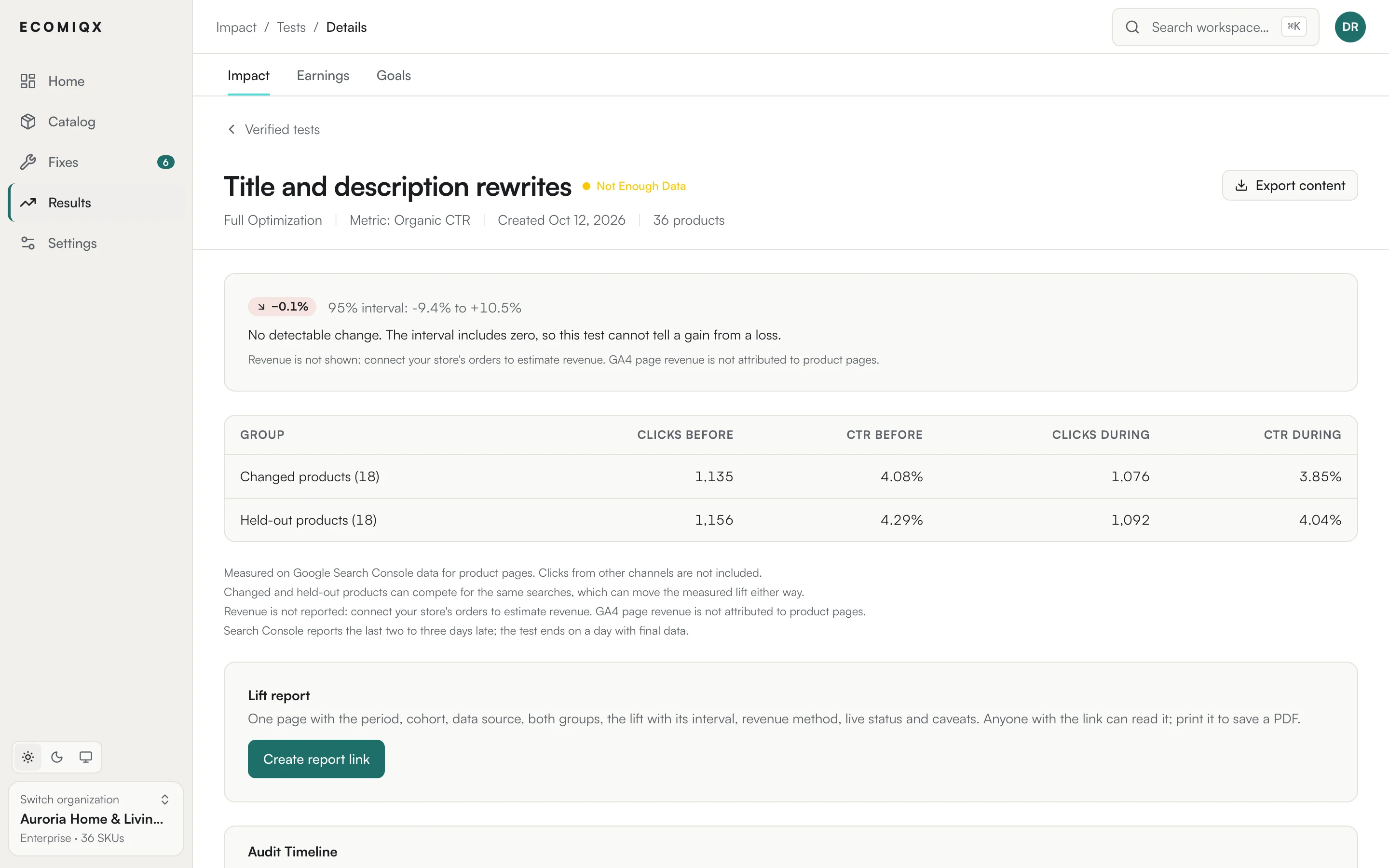
Measured tests (Business and up) and pilots compare changed products with a comparable group left unchanged, and report the lift with an interval. Tests are opt-in and run on titles, descriptions and translations.
Each test collects a baseline, runs for a set period, then recommends rolling the change out or back. You decide, and every step is logged.
- Opt-in, from the Business plan up
- Revenue, organic clicks, impressions or CTR as the primary metric
- Confidence and a difference-in-differences adjusted lift
- Roll out to all products, or roll back to the originals
Ask Your Catalog
Copilot answers questions about your catalog with the data behind them, joining catalog data with Search Console, Merchant Center and keyword data where you have connected them.
From the same thread you can queue rewrites or translations for the products it finds.
- Questions in plain language over your connected data
- Rewrites and translations queued from the thread
- Threaded conversations with full history
Automations With a Ceiling You Set
An automation works toward a goal you define, picks the products to work on and drafts fixes on a schedule.
Autonomy has three levels. Report only changes nothing. Propose sends every draft to your review queue. Autonomous saves drafts that pass every safety check as approved, ready to publish; anything flagged still goes to review. A monthly credit cap per automation limits spend.
Impact tracking on paid plans compares each changed product's clicks and revenue before and after the change with similar unchanged products: an estimate with a confidence score, not a controlled test. On Business and up, automations move up or down an autonomy level on those results, never above the ceiling you set.
- Three autonomy levels: report only, propose, autonomous
- A monthly credit cap per automation
- Impact tracked for each applied change
- Learnings on each automation, with sample size and confidence
Start Your Free
Catalog Audit
The free audit needs no account: enter your store address and we email you a private report on up to 500 of your product pages.